Back to SATO Business Suite
automotive 2023

SATO POS — Outlet Operations

Product Engineer

Available on:

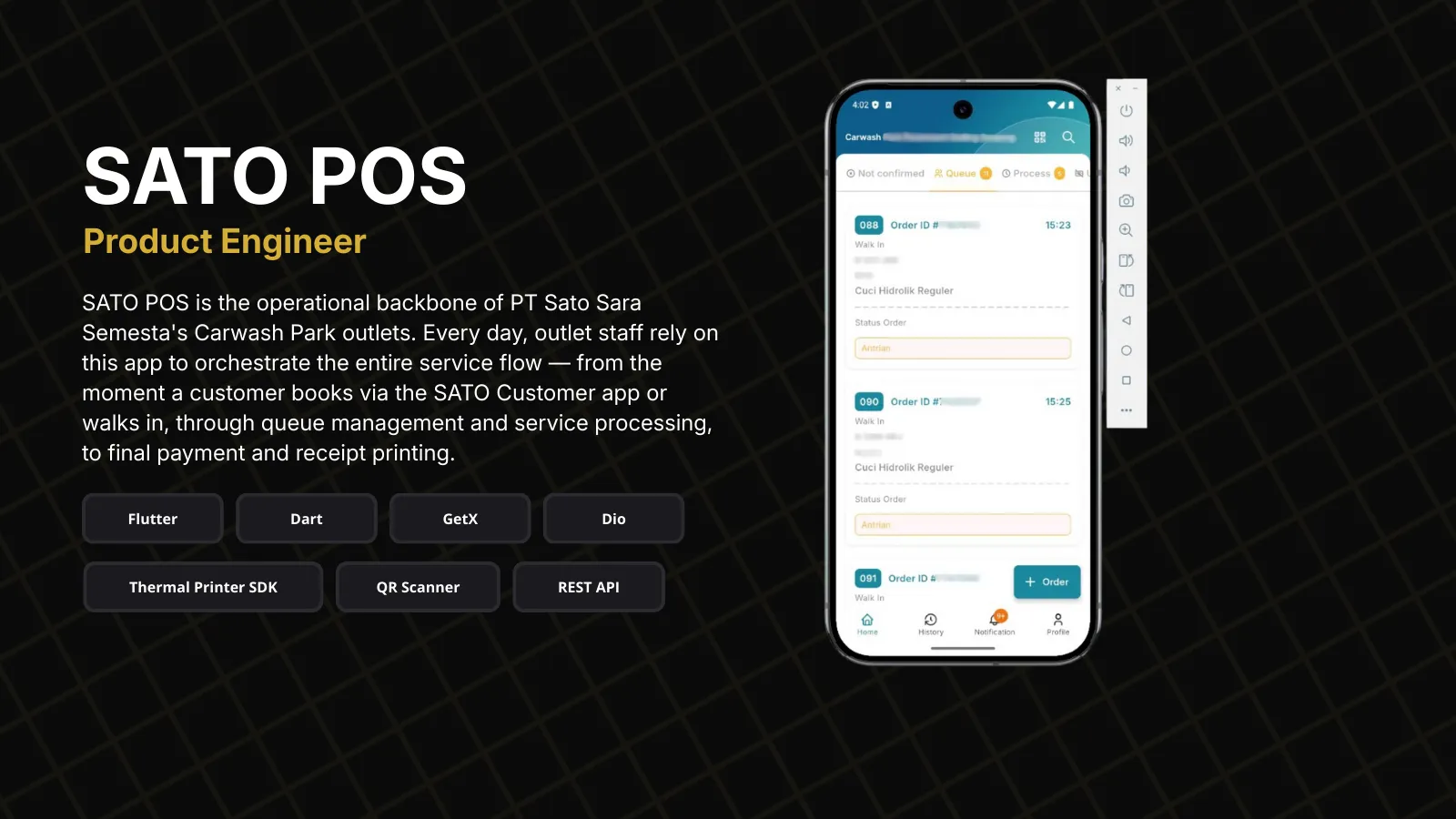
SATO POS is the operational backbone of PT Sato Sara Semesta's Carwash Park outlets. Every day, outlet staff rely on this app to orchestrate the entire service flow — from the moment a customer books via the SATO Customer app or walks in, through queue management and service processing, to final payment and receipt printing.

The app transforms what was once a chaotic pen-and-paper process into a streamlined digital workflow. When an app order comes in, staff receive instant push notifications. Walk-in customers can be registered on the spot with vehicle details. The visual queue board shows all orders in their current state, making it easy to track progress and avoid mix-ups.

What makes SATO POS special is its understanding of carwash operations. Orders flow through distinct stages: waiting for confirmation → queued → in process → waiting for payment → completed. Staff can add services, apply vouchers, and process payments — all while the companion SATO Customer app keeps customers informed of their order status in real-time.

Developed in collaboration with Art By Code, an IT consulting company.
Flutter Dart GetX Dio Firebase Cloud Messaging GetStorage Thermal Printer SDK REST API

Project Highlights

Visual order board with real-time status tracking across 5 stages: confirmation → queue → process → payment → complete

Dual order handling for both app bookings and walk-in customers in unified interface

Push notifications for incoming app orders with instant confirmation workflow

Service management with add-on services, voucher redemption, and dynamic pricing

Thermal printer integration for receipts and queue tickets

Order history with filtering and search for daily operations review

Staff profile management with outlet assignment

Syncs in real-time with SATO Customer app for customer visibility

Project Info

Role Product Engineer
Year 2023
Category automotive

Tech Stack

FlutterDartGetXDioFirebase Cloud MessagingGetStorageThermal Printer SDKREST API

Problem → Solution → Impact

Problem

Carwash Park outlets managed orders through a mix of phone calls, WhatsApp messages, and handwritten logs. When app bookings and walk-ins arrived simultaneously, staff often lost track of which customer was next.

There was no visibility into order status. Customers would call repeatedly asking "Is my car done yet?" Staff had no quick answer — they had to physically check with the wash bay team.

Payment reconciliation was a nightmare. End-of-day cash counts rarely matched the paper logs. Walk-in orders sometimes went unrecorded, leading to revenue leakage.

Printing receipts required a separate desktop system. Staff had to walk to the back office, type in order details, and print — adding friction to every transaction.

Solution

Built a unified order dashboard that displays all orders — both app bookings and walk-ins — in a single visual board. Each order card shows customer name, vehicle, services, and current status. Staff can see the entire queue at a glance.

Implemented 5-stage order flow with one-tap status updates. When a car moves to the wash bay, staff tap "Process." When washing completes, they tap "Ready for Payment." Each status change pushes a notification to the customer's SATO app.

Every transaction is recorded digitally with timestamp, staff ID, and payment method. The system generates daily reports automatically. Management can track revenue by outlet, by service type, and by time period.

Integrated Bluetooth thermal printer support directly in the app. Staff can print receipts and queue tickets without leaving the order screen. Just tap print, and the receipt comes out.

Impact

  • Order confusion eliminated — every order has a clear status visible to all staff
  • Customer calls reduced by 70% as they can track status in their own app
  • Revenue reconciliation now takes minutes instead of hours
  • Queue management improved — customers know their position and estimated wait time
  • Staff can handle 30% more orders with the same headcount
  • Management has real-time visibility into all outlet operations

Engineering Challenges & Solutions

Technical obstacles encountered during development and the architectural decisions made to overcome them.

Challenge

Real-time sync between POS and Customer app for order status

Solution

Implemented optimistic UI updates with server confirmation. When staff updates order status, the UI reflects immediately while an API call syncs the change. The Customer app receives push notification via FCM within seconds. If the server call fails, the UI rolls back with error feedback.

Challenge

Bluetooth thermal printer integration across different printer brands

Solution

Abstracted printer communication through a unified interface that handles ESC/POS commands for thermal printers. The app auto-discovers nearby Bluetooth printers and remembers paired devices. Receipt templates are formatted server-side, ensuring consistent output regardless of printer model.

Challenge

Managing complex order state machine with business rules

Solution

Designed order state machine with clear transitions: WAITING_CONFIRMATION → QUEUED → PROCESS → WAITING_FOR_PAYMENT → PAID_OFF (or CANCELED at any stage). Each transition has validation rules — for example, only confirmed orders can be queued, and payment requires all services to be completed. The state machine is enforced both client-side and server-side.

Challenge

Handling simultaneous walk-in and app orders without conflicts

Solution

Built queue numbering system that assigns unique daily sequence numbers to all orders. App orders get pre-assigned numbers when booked; walk-in orders get numbers at registration. The queue board displays orders by number regardless of source, ensuring fair first-come-first-served service.

Architecture Overview

SATO POS follows a modular GetX architecture with clear separation between UI, business logic, and data layers. The app uses a service-based pattern where each feature module has its own controller, service, and views. API communication is centralized through a BaseService class with automatic token management and error handling.

Presentation
Flutter UIGetX ControllersFeature Modules
Domain
Order State MachineBusiness RulesModels
Data
REST API ServiceGetStorage CacheDio HTTP Client
Integration
FCM HandlerBluetooth PrinterNotifications

Screenshots

Interested in working together?

Let's discuss your next project and create something amazing.

Get In Touch